
Seb’s Autoreiniging
A complete website and booking system that helps a mobile car-cleaning business present its work, manage offers, and take appointments online.
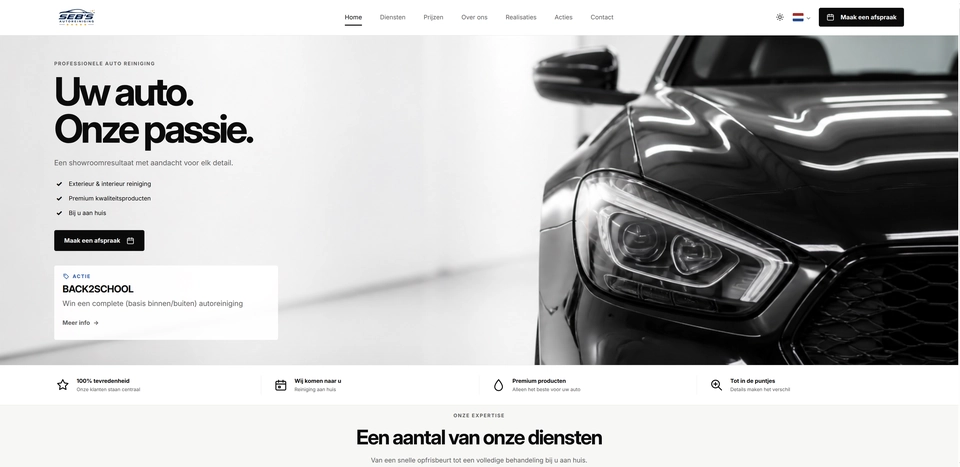
Seb’s Autoreiniging is a Belgian website for a mobile car-cleaning business. It gives the business one clear place to present services and prices, publish before-and-after work, share current offers, and take appointments online.
I built both the public website and the private management area behind it. Seb can update services and vehicle-based prices, publish promotions (Acties), create discount codes, add before-and-after galleries (Realisaties), and manage availability and appointments without changing the website’s code.
The five-step booking flow keeps a detailed process easy for the customer:
- choose one or more treatments
- select a vehicle, date, and available time
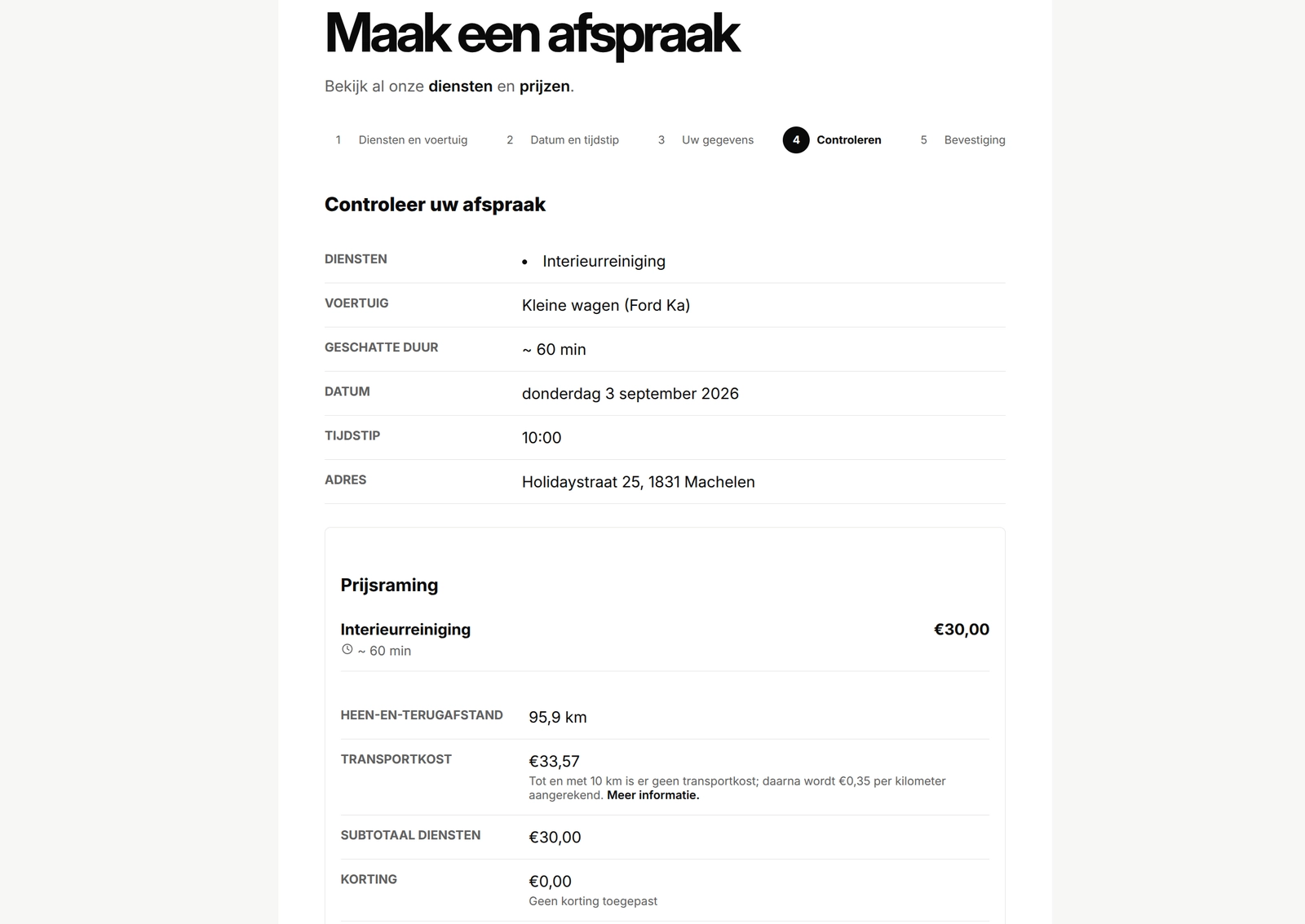
- enter an address and review the calculated price before confirming
Behind the scenes, the website checks travel distance, applies an eligible discount, prevents double bookings, and prepares owner notifications. Uploaded service, promotion, and gallery images are automatically prepared in several sizes so they stay clear without making mobile pages unnecessarily heavy.
Tools I reused
I reused four Django apps I had already built: Django Contact Form for customer messages, Django Appointments for bookings and distance-based pricing, Django Reviews for customer reviews and owner replies, and a modified version of Django Projects for the Realisaties galleries.
The private management area uses two-factor authentication. Booking pages also keep customer details out of page addresses and search results. This project shows how I turn a real business workflow into a website that is straightforward for customers and practical for the owner to manage day to day.
Seb’s Autoreiniging gallery
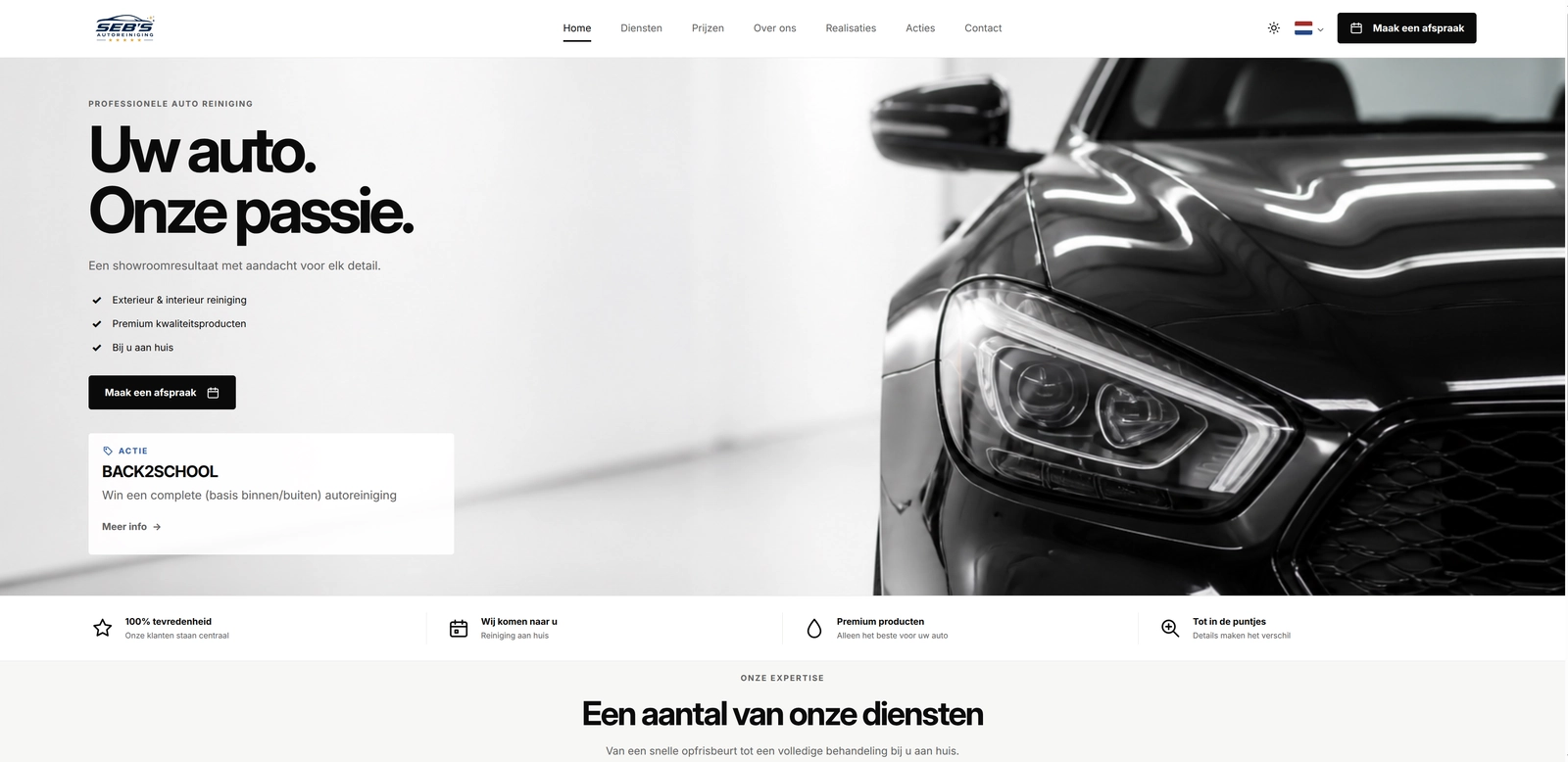
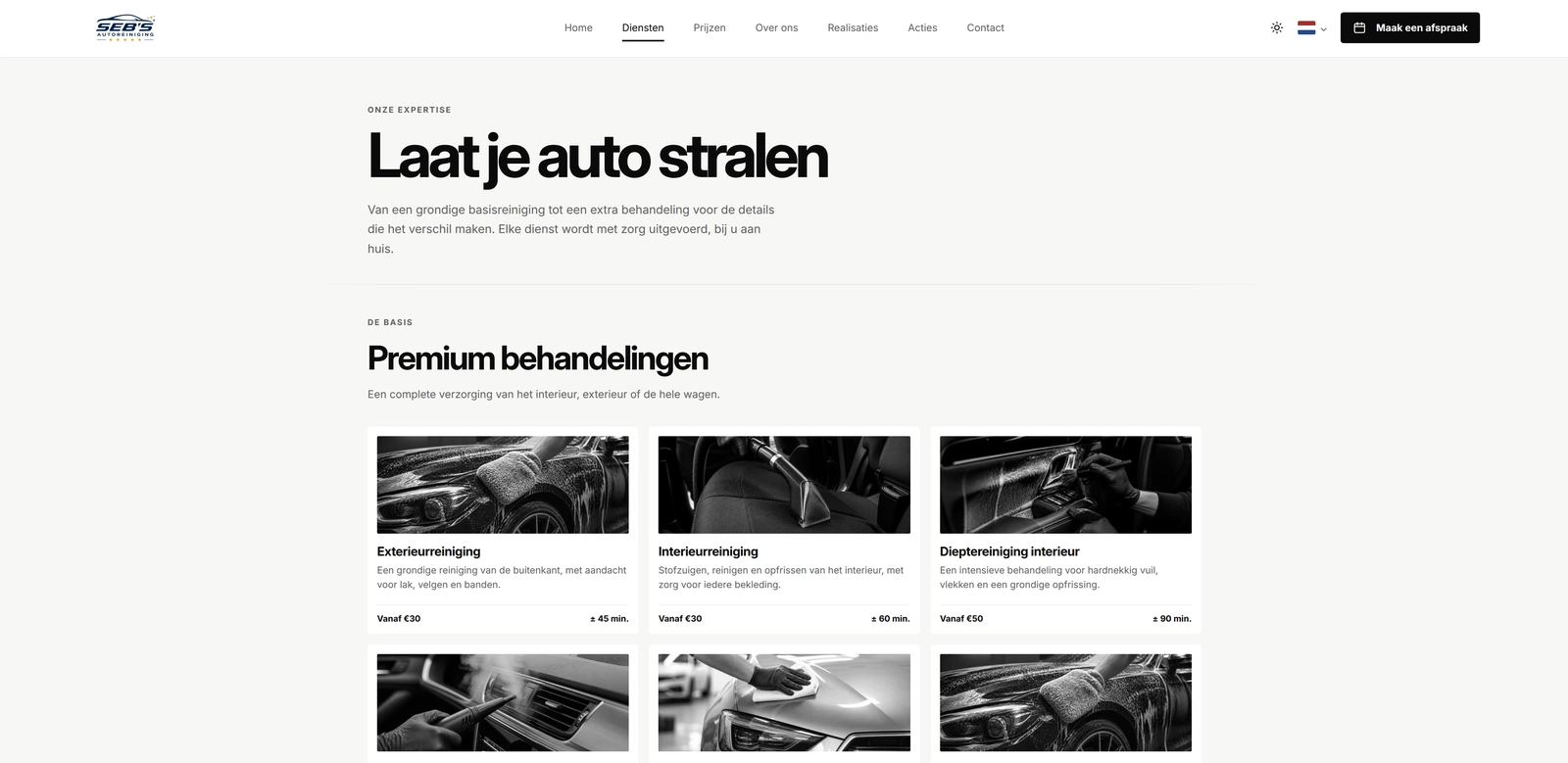
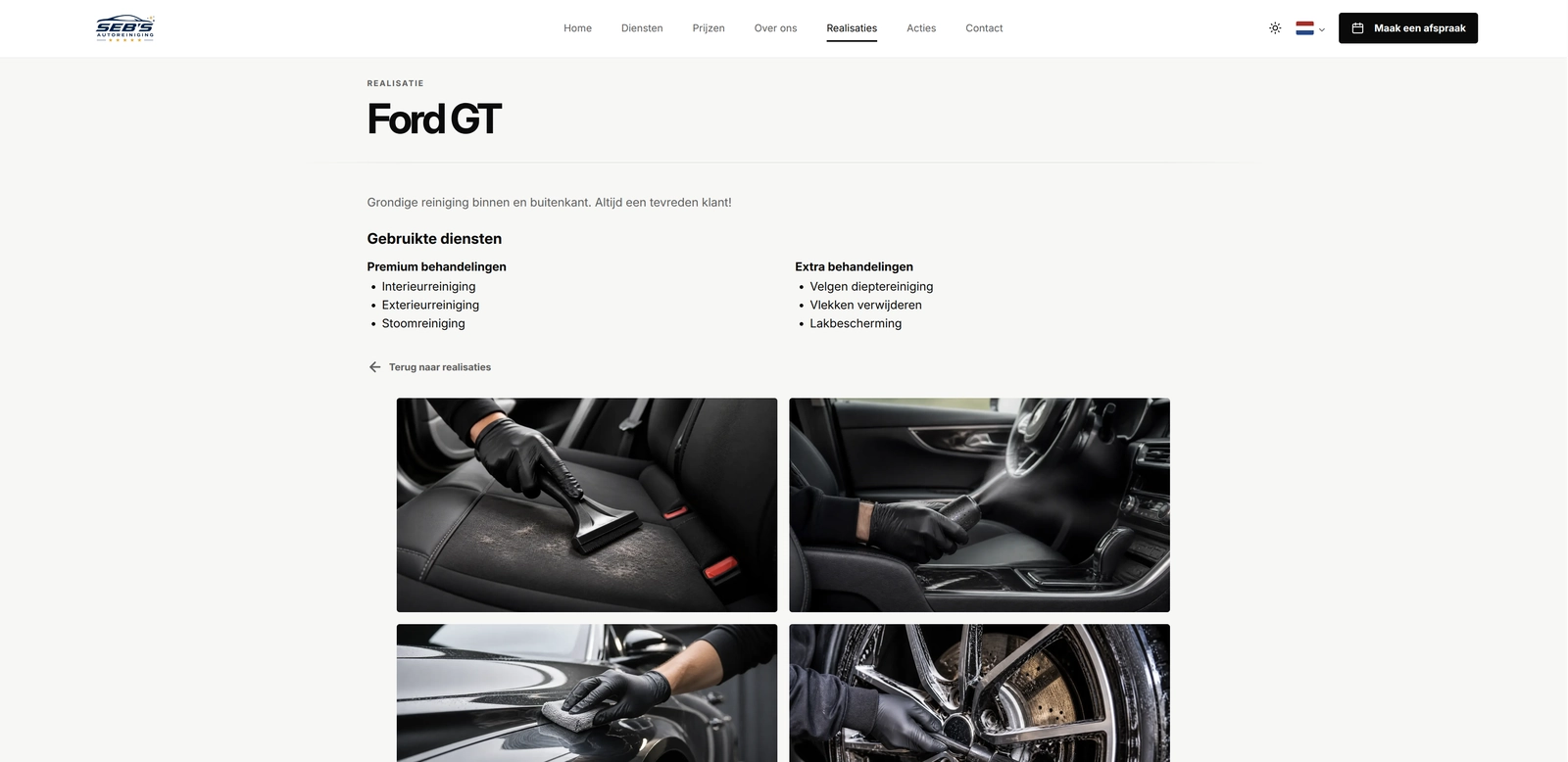
These screens show the complete journey: customers can explore services and completed work, book online, and receive a clear price estimate, while the owner manages the business content from a private dashboard.
Open gallery 6 images
Project information
- Category
- Websites
Built with
- Python
- Django
- PostgreSQL
- HTML5
- CSS3
- JavaScript
- Cloudflare







View full feature list
Seb’s Autoreiniging is more than a brochure website. It combines the public pages customers need with a private management area for the day-to-day work behind the business. The main project page gives a short overview; this page explains the complete feature set and the separate parts I built inside the website.
The main website
- Gives a mobile car-cleaning business a clear, recognisable online home.
- Uses a responsive layout that works across phones, tablets, and desktop screens.
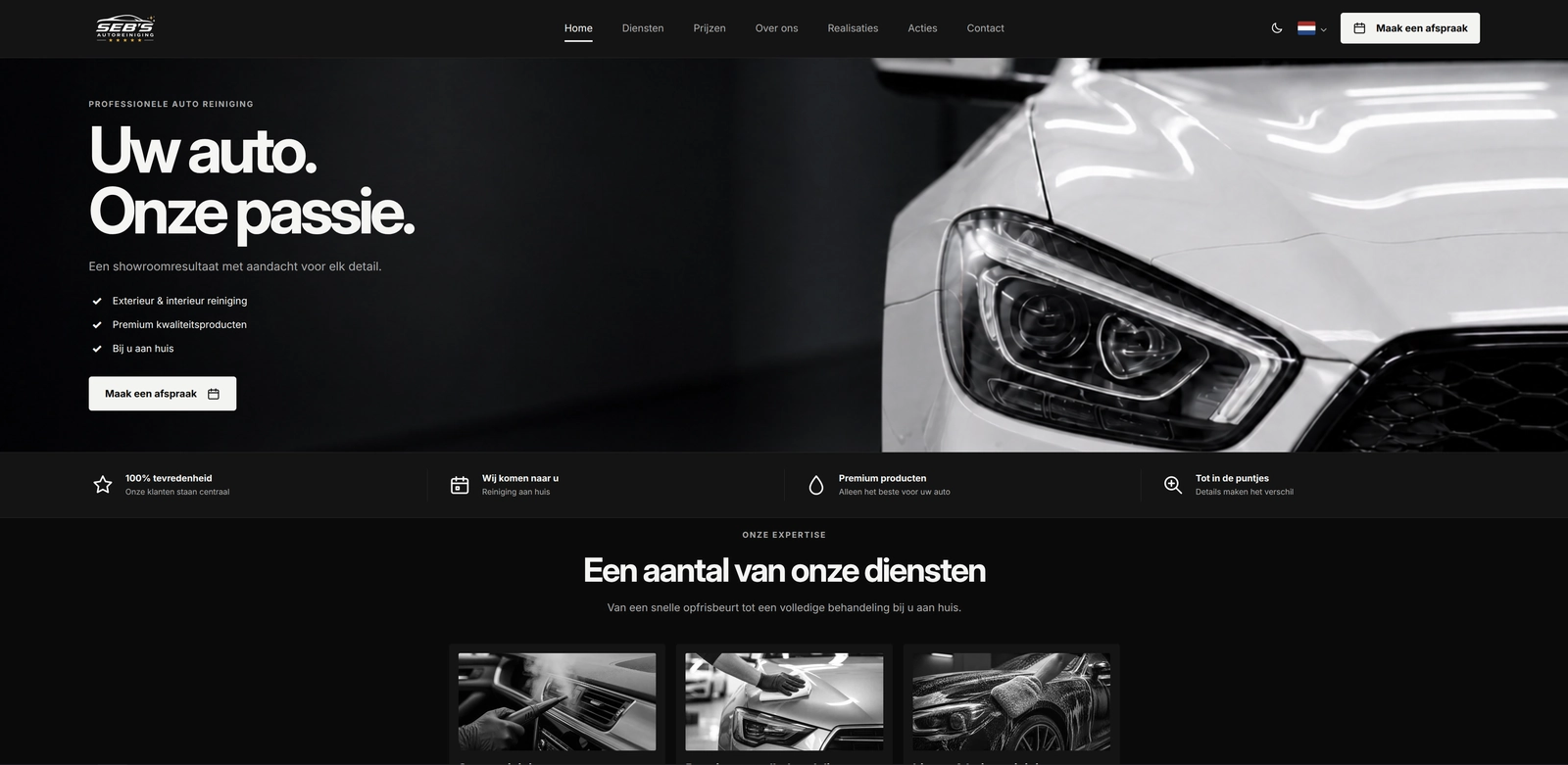
- Opens with a focused homepage showing the business promise, key benefits, current promotion, featured services, recent work, and a clear appointment button.
- Includes separate pages for services, prices, promotions, completed work, the business story, contact details, privacy information, and terms.
- Uses a sticky navigation bar so the important pages and appointment button stay easy to reach.
- Provides light and dark appearance modes and remembers the visitor’s choice on that device.
- Keeps the navigation usable when JavaScript is unavailable.
- Supports keyboard navigation, visible focus styles, a skip link, useful form labels, and accessible image descriptions.
- Uses the existing business branding, car photography, social links, and contact details consistently across the site.
- Keeps the current temporary website out of search results with matching page and response instructions.
- Uses normal server-rendered pages, so visitors do not need a separate app or account.
Diensten: services and prices
The Diensten app gives customers a clear view of what can be booked and gives Seb a practical way to keep that information current.
- Shows published treatments in two understandable groups: premium treatments and optional extras.
- Gives each service its own name, short explanation, estimated duration, and image.
- Stores separate prices for small cars, family cars or estate cars, and SUVs or caddies.
- Shows a simple “from” price on the services page and the complete vehicle-based price table on the prices page.
- Uses Dutch price and duration formatting throughout the public website.
- Lets Seb create incomplete services as private drafts before they are ready for customers.
- Lets Seb publish, unpublish, search, filter, edit, and delete services from the private management area.
- Allows up to three published services to be featured on the homepage.
- Lets Seb change the display order within each service group with drag-and-drop or simple move controls.
- Checks an out-of-date ordering form before saving, which helps prevent one edit from silently overwriting another.
- Requires complete prices and a valid image before a service can be published.
- Protects services that are still used by a published Realisatie from accidental deletion.
- Prepares several image sizes automatically, helping the same service photo look clear without loading an unnecessarily large file on a phone.
- Keeps the previous service and images intact if a replacement image or database save fails.
Acties: promotions and useful announcements
Acties is the part of the website Seb can use for a temporary offer, competition, seasonal message, or other useful information.
- Supports both promotional messages and normal information announcements.
- Gives each Actie a title, short introduction, optional longer text, and optional flyer.
- Lets Seb prepare an announcement as a draft before publishing it.
- Uses start and end times so an announcement can appear and disappear at the right moment.
- Prevents published announcement periods from overlapping.
- Shows only the currently active announcement to visitors.
- Adds a compact teaser to the homepage with a link to the full Acties page.
- Gives INFO and ACTIE announcements their own clear label and visual treatment.
- Lets visitors open an optional flyer in a larger image viewer.
- Supports keyboard closing, backdrop closing, focus restoration, and clear image alternative text in that viewer.
- Lets Seb replace or remove a flyer without editing the website code.
- Can connect one eligible discount code to an announcement.
- Keeps draft, scheduled, expired, and unpublished announcements off the public website.
Kortingscodes: discount codes
The Kortingscodes app keeps discounts separate from promotional text. That makes a code reusable and lets the website check it again when someone books.
- Supports a fixed euro discount or a percentage discount.
- Uses short codes made from uppercase letters and numbers.
- Prevents two codes from being created with the same letters in a different case.
- Lets Seb keep a code as a draft or activate it for a defined date range.
- Supports unlimited codes and codes with a limited number of uses.
- Automatically retires expired codes so they are no longer offered.
- Lets an eligible code be linked to the current Actie.
- Shows the linked code and its value on the Acties page only while both remain valid.
- Includes a copy button with clear success and failure feedback.
- Does not reveal the discount code in the homepage teaser.
- Automatically applies the current eligible Actie code during appointment review.
- Lets a customer enter one different valid code before confirming the booking.
- Replaces the automatic code instead of stacking several discounts together.
- Rechecks the code and any remaining usage allowance when the appointment is confirmed.
- Stores the discount used with the appointment so later changes do not rewrite an earlier booking.
Realisaties: before-and-after work
Realisaties gives the business a proper portfolio area for showing completed car-cleaning work instead of relying only on social-media posts.
- Provides an overview page for all published Realisaties.
- Gives every published project its own page with a title, optional explanation, services used, and ordered image gallery.
- Connects each Realisatie to the actual services used for that job.
- Groups those services into premium treatments and extras for easier reading.
- Lets visitors open gallery images in a larger viewer and move through the full set.
- Supports multiple images, making before-and-after comparisons easy to present.
- Lets Seb create and keep incomplete Realisaties as drafts.
- Lets Seb upload several images, remove images, choose a feature image, and change the gallery order from one management page.
- Requires at least one service, one complete image, and a feature image before publishing.
- Lets up to three published Realisaties appear as featured work on the homepage.
- Provides ordering controls for both the Realisaties overview and the images inside each gallery.
- Automatically prepares responsive image sizes for phones and larger screens.
- Keeps incomplete records or missing image files off the public pages instead of showing broken cards.
- Returns a normal not-found page for unknown, unpublished, or incomplete Realisaties.
Appointments: complete online booking
The Appointments app turns the website into a working booking system. Customers can choose what they need, see when Seb is available, receive a calculated estimate, and confirm without moving to a separate platform.
Customer booking flow
- Uses a guided five-step flow with clear progress information.
- Lets the customer choose one or more published services.
- Requires a premium treatment before optional extras can be added.
- Lets the customer select a vehicle type and enter its make and model.
- Shows only dates and times that can fit the complete selected treatment.
- Excludes past times, existing appointments, closures, and unavailable periods.
- Preserves still-valid answers when the customer goes back to an earlier step.
- Gives the customer a clear restart option when they want to begin again.
- Shows calm, useful feedback when no service or appointment time is available.
- Uses normal form labels, error summaries, field-level messages, and touch-friendly controls.
Address, travel, and pricing
- Uses Google address suggestions to help the customer select a complete service address.
- Requires an explicit address choice and a house number instead of trusting unfinished typed text.
- Checks the chosen place again on the server before using it.
- Calculates driving distance with Google Routes.
- Keeps the browser-facing and server-facing Google credentials separate.
- Explains when address information is shared with Google and links to the privacy page.
- Does not store search history, map coordinates, or the complete raw response from Google.
- Calculates service prices from the chosen treatments and vehicle type on the server.
- Adds the duration of every chosen service to find the complete appointment length.
- Includes round-trip travel in the estimate.
- Keeps round trips up to and including 10 kilometres free.
- Adds a €0.35 per kilometre travel fee when the complete round trip is longer than 10 kilometres.
- Shows each service amount, subtotal, distance, travel fee, discount, and estimated total before confirmation.
- Ignores totals or distance values changed in the browser and recalculates them from trusted information.
- Refreshes an old route or discount before confirmation and asks the customer to review a changed estimate again.
Confirmation, privacy, and reliability
- Creates one confirmed appointment from one valid final submission.
- Saves a fixed copy of the selected services, durations, prices, route, discount, total, and booking wording.
- Prevents repeated clicks, retries, or an old browser tab from creating duplicate bookings.
- Checks availability again while saving, which protects the same time from being booked twice.
- Handles Brussels local time correctly, including difficult daylight-saving-time changes.
- Stores the customer draft in the current private session instead of putting personal details in the page address.
- Keeps booking and confirmation pages out of browser caches and search results.
- Shows the confirmation page only from the booking session and removes it after use.
- Limits excessive final booking submissions without storing a raw visitor IP address.
- Saves an owner notification before showing success, then uses the existing email queue to deliver and retry it.
- Sends the notification only to the business owner and uses the customer’s email address as the reply address.
- Keeps an accepted appointment stored if the notification service has a temporary problem.
Consent and follow-up
- Keeps follow-up consent and photo consent optional and switched off by default.
- Can schedule an owner-only follow-up reminder six weeks after the appointment.
- Does not automatically send a marketing or follow-up email to the customer.
- Saves the exact consent wording, time, and source used during booking.
- Lets Seb later record a carefully documented photo-consent change in the private management area.
- Keeps the earlier consent history when permission is withdrawn or given again.
Owner schedule management
- Lets Seb define normal weekly working hours.
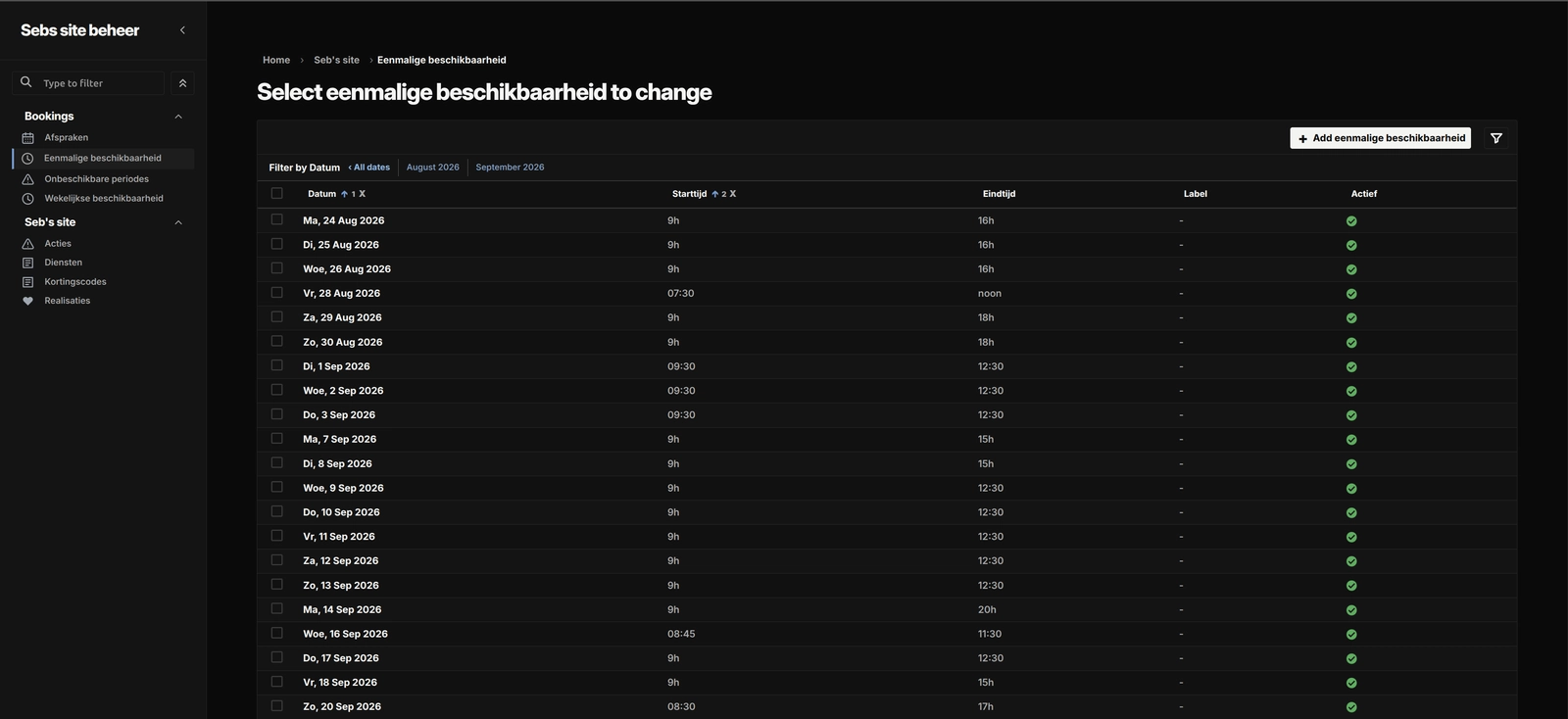
- Supports extra one-off availability for a particular date.
- Supports closures for holidays, public holidays, vacations, or another reason.
- Lets one saved availability window be copied across a future date range.
- Reports which copied dates were created, replaced, or skipped.
- Shows appointment, customer, service, price, discount, consent, and notification details in the private management area.
- Keeps the important booking and price record read-only after confirmation.
- Provides deliberate confirmation steps for cancelling or rescheduling an appointment.
- Makes a cancelled time available again when it is still valid.
- Rechecks availability and conflicts before a rescheduled time is saved.
- Lets Seb withdraw an upcoming follow-up reminder without deleting the booking history.
- Includes a scheduled command for finding due owner follow-up reminders.
Reviews: customer feedback and owner replies
Customers can share their experience, and Seb can check each review and reply before it appears on the website.
Reading and leaving reviews
- Shows approved reviews with a star rating, customer name, date, and review text, with the newest first.
- Lets customers leave their name blank to appear as Anonymous.
- Shows the average rating, total number of reviews, and a breakdown by star rating.
- Lets visitors filter by rating and browse 30 reviews per page. The overall figures still include all approved reviews.
- Provides direct links to individual reviews and explains when a linked review is no longer available.
- Shows the latest 10 approved reviews in a scrolling homepage section, with links to read longer comments.
- Lets customers choose a rating from one to five stars and write up to 255 characters of feedback.
- Supports an optional public name of up to 30 characters and requires a private car description of up to 30 characters.
- Explains that car details stay private and that reviews need approval before publication.
- Shows character counts, helpful error messages, and a confirmation after a review is accepted.
- Keeps entered text when the form returns with an error or an extra security check.
- Keeps reviews and owner replies in the language they were written in.
- Provides labelled fields, keyboard-friendly rating controls, and messages that assistive technology can announce.
- Respects reduced-motion preferences in the homepage review carousel and pauses movement around interaction.
Protecting the form and customer details
- Uses a hidden honeypot field to help catch bots that fill in fields ordinary visitors leave empty.
- Limits repeated attempts and accepted reviews from the same IP address within a set period.
- Stores a protected identifier made from the IP address for these checks, rather than saving the raw address in review protection records.
- Uses Django’s CSRF protection to help block unwanted form submissions from other websites.
- Gives each form a signed, time-limited digital stamp. Unusually fast submissions or missing, invalid, or expired stamps trigger a short verification question.
- Checks required fields, rating choices, and text limits again on the server.
- Prevents a retry of the same accepted submission from creating another review.
- Keeps the original review and its publication notice unchanged during moderation.
- Keeps private car information, spam checks, and management details out of the public review pages.
- Tells browsers and caches not to store review forms and confirmation pages, and asks search engines to leave them out of search results.
Managing reviews and notifications
- Gives Seb a review list in the private management area, with filters for rating, review status, and email delivery status.
- Requires approval before a new review appears publicly.
- Lets Seb approve, reject, reconsider, or unpublish reviews without rewriting the customer’s original feedback.
- Lets Seb write and edit replies of up to 1,000 characters, with a character counter.
- Allows a reply to be prepared before approval and shown when the review becomes public.
- Tracks when a reply was published or edited and provides a separate action to remove it.
- Requires confirmation before deleting a review and removes its linked notification email as part of the same action.
- Saves the review before trying to notify Seb by email, so an email problem doesn’t lose the customer’s feedback.
- Shows notification delivery status and lets Seb retry after checking a failed or uncertain send.
- Avoids automatically resending an email when delivery is uncertain and blocks deletion while an unfinished send needs checking.
Contact and customer messages
The contact form is provided by the shared contact app in the wider Django project, but it is connected specifically to Seb’s website.
- Gives visitors another way to ask a question when they are not ready to book.
- Sends Seb messages to the trusted owner address chosen by the server.
- Keeps the visitor’s email as the reply address so answering is straightforward.
- Saves an accepted message before trying to send its notification.
- Includes spam checks, a hidden honeypot, a signed form token, a simple challenge when needed, and submission limits.
- Prevents a repeated accepted form from creating duplicate messages.
- Shows clear form errors and a normal success message without exposing internal delivery details.
Private business management
- Uses a dedicated Seb management area instead of mixing business content into every other website in the shared Django project.
- Requires an authorized staff account and two-factor authentication.
- Uses familiar forms, lists, search, filters, and confirmation pages rather than a separate custom dashboard application.
- Groups services, Acties, discount codes, Realisaties, availability, and appointments together.
- Keeps Seb-owned content out of the normal shared and development Admin areas.
- Checks permissions again for important changes such as publishing, deleting, reordering, cancellation, and rescheduling.
- Uses drafts and publication checks so incomplete content can be saved privately without appearing to customers.
- Gives image previews and safe, understandable errors when an upload or save fails.
Image handling
- Accepts JPEG, PNG, and WebP uploads for managed website content.
- Rejects unsupported, animated, oversized, or extremely large images.
- Corrects photo orientation when that information is present in the uploaded file.
- Keeps the original and creates smaller WebP versions for different screen sizes.
- Does not stretch a small image to create a larger version.
- Requires useful alternative text where a public image needs it.
- Loads suitable image sizes and reserves their space, helping pages stay clear and stable while loading.
- Removes replaced files only after the related content change has completed successfully.
- Cleans up newly created files when a database save fails, avoiding half-finished media records.
Current project boundaries
- The website is currently Dutch-only.
- The language selector is a visual placeholder and does not yet switch languages.
- The temporary
/seb/showcase is deliberately kept out of search engines. - Customers do not need accounts and cannot look up or change an appointment through a public account area.
- Booking notifications and scheduled follow-up reminders are owner-facing; the current flow does not send a customer confirmation email.
- There is no public JSON API, separate frontend application, or native mobile app.
- Public pages and business management remain part of one maintainable Django website.