
Django Appointments
A Django booking workflow that combines availability, Google route checks, kilometre-based pricing, appointments, and owner follow-up in one place.
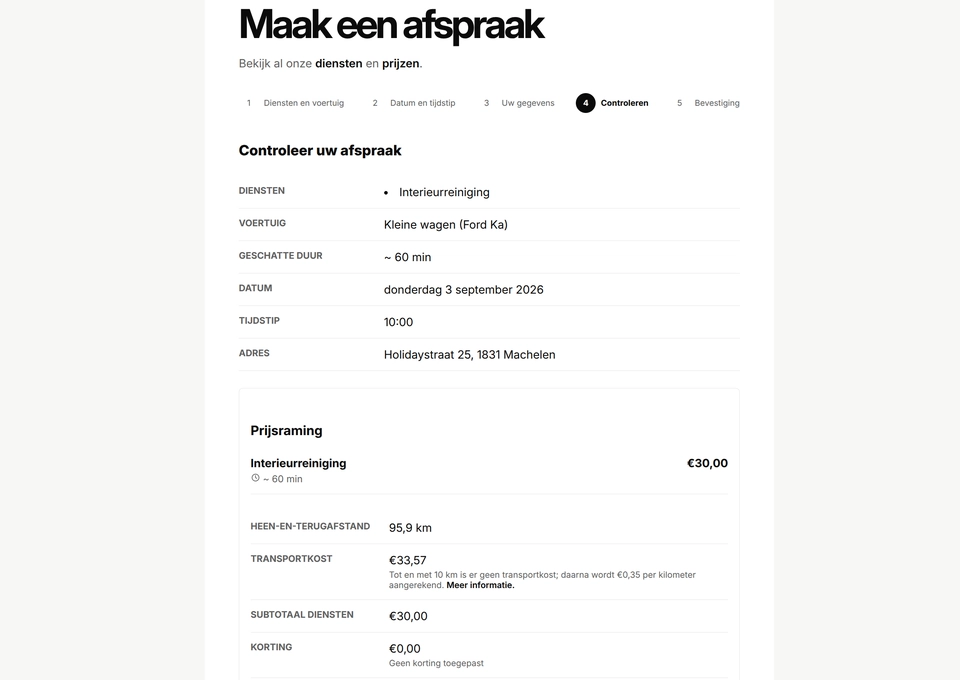
This Django feature gives a mobile service business a clear way to accept and manage appointments without relying on a separate booking platform. Customers move through a five-step, mobile-friendly form that checks services, vehicle details, availability, address, price, discounts, and consent before anything is saved.
Careful booking rules
The server stays in control of the important decisions. It recalculates availability and pricing before confirmation, handles Brussels daylight saving changes, blocks duplicate submissions, and keeps an unchanging snapshot of what the customer booked.
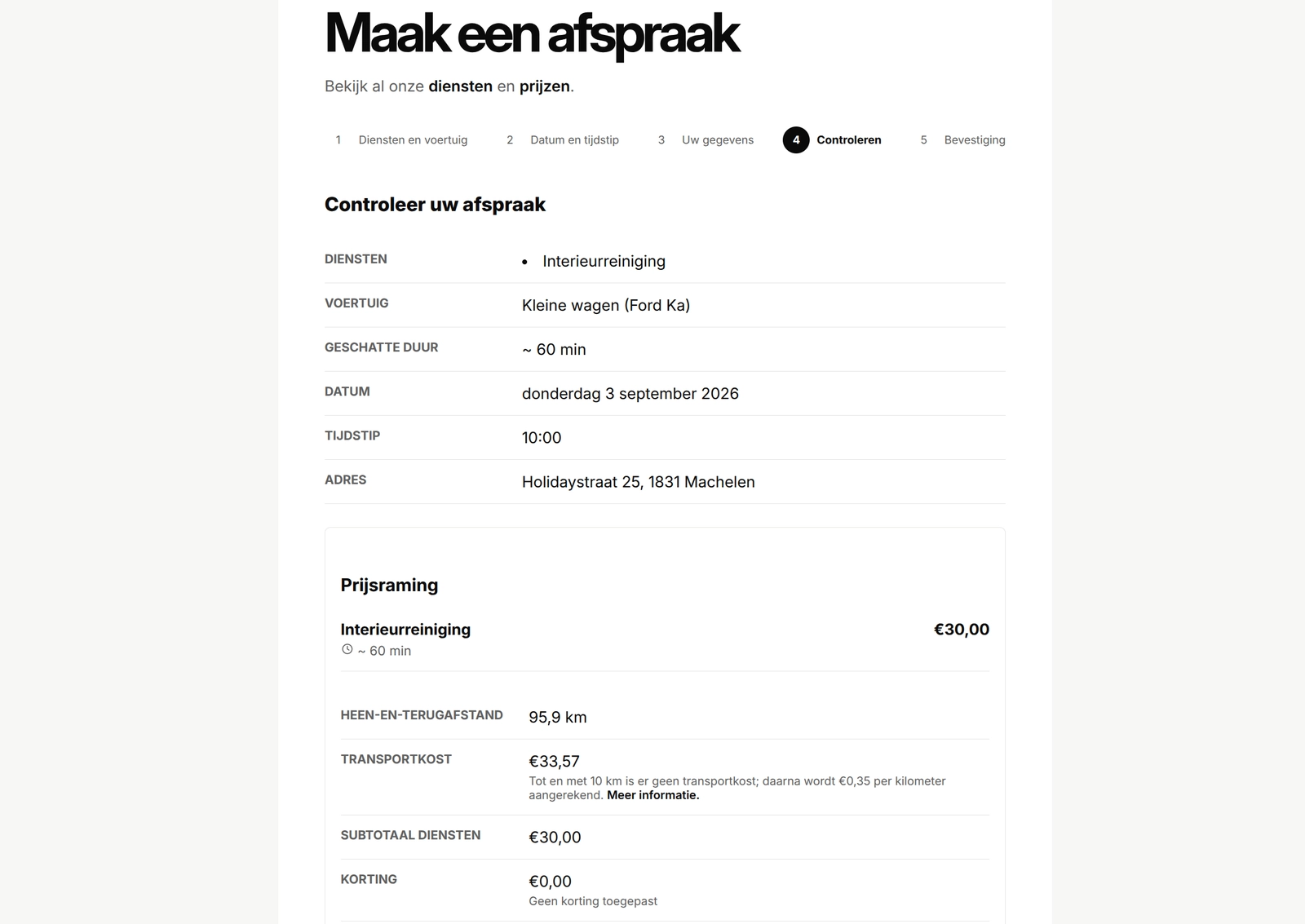
Google Places helps the customer select a complete address, while Google Routes calculates the driving distance from the business. The server turns that into a complete round trip: up to and including 10 km is free, while longer routes cost €0.35 per kilometre. If the address, distance, route, or discount changes during the final check, the customer sees the updated estimate and must confirm it again. Browser-posted addresses, kilometres, and totals are never treated as authoritative.
Useful for the owner too
The protected Django Admin covers weekly hours, one-off changes, closures, cancellations, rescheduling, follow-up reminders, and photo-consent records. Booking emails are queued once and retried separately, so a temporary delivery problem doesn't create a second appointment.
I kept the workflow server-rendered and session-backed. That makes the steps easier to follow, test, and adapt inside another Django project. I also wrote a closer look at the complete customer journey with screenshots and more detail. The public repository includes the app, migrations, responsive light and dark templates, focused tests, current documentation, and practical host-integration examples.
Django Appointments gallery
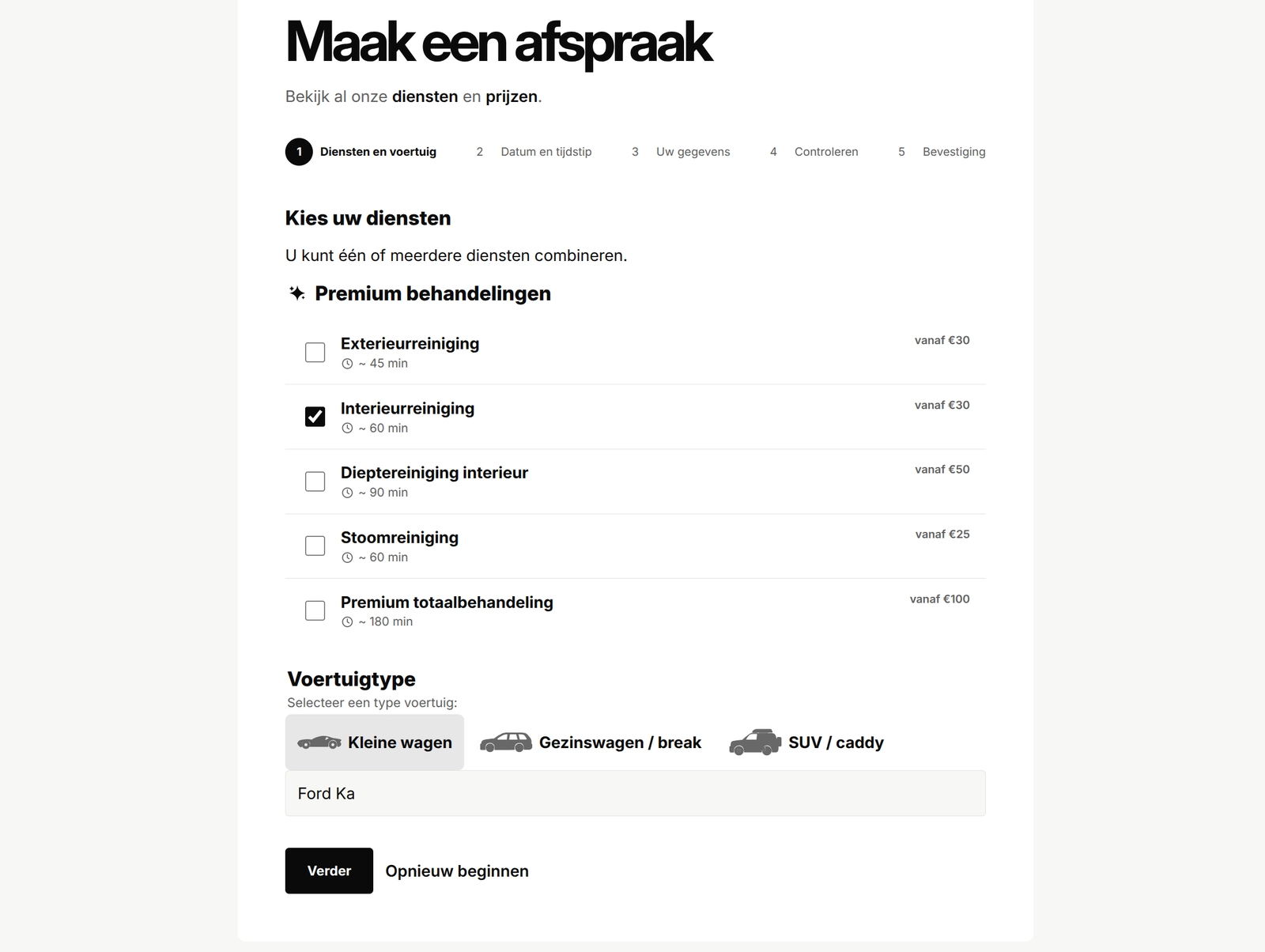
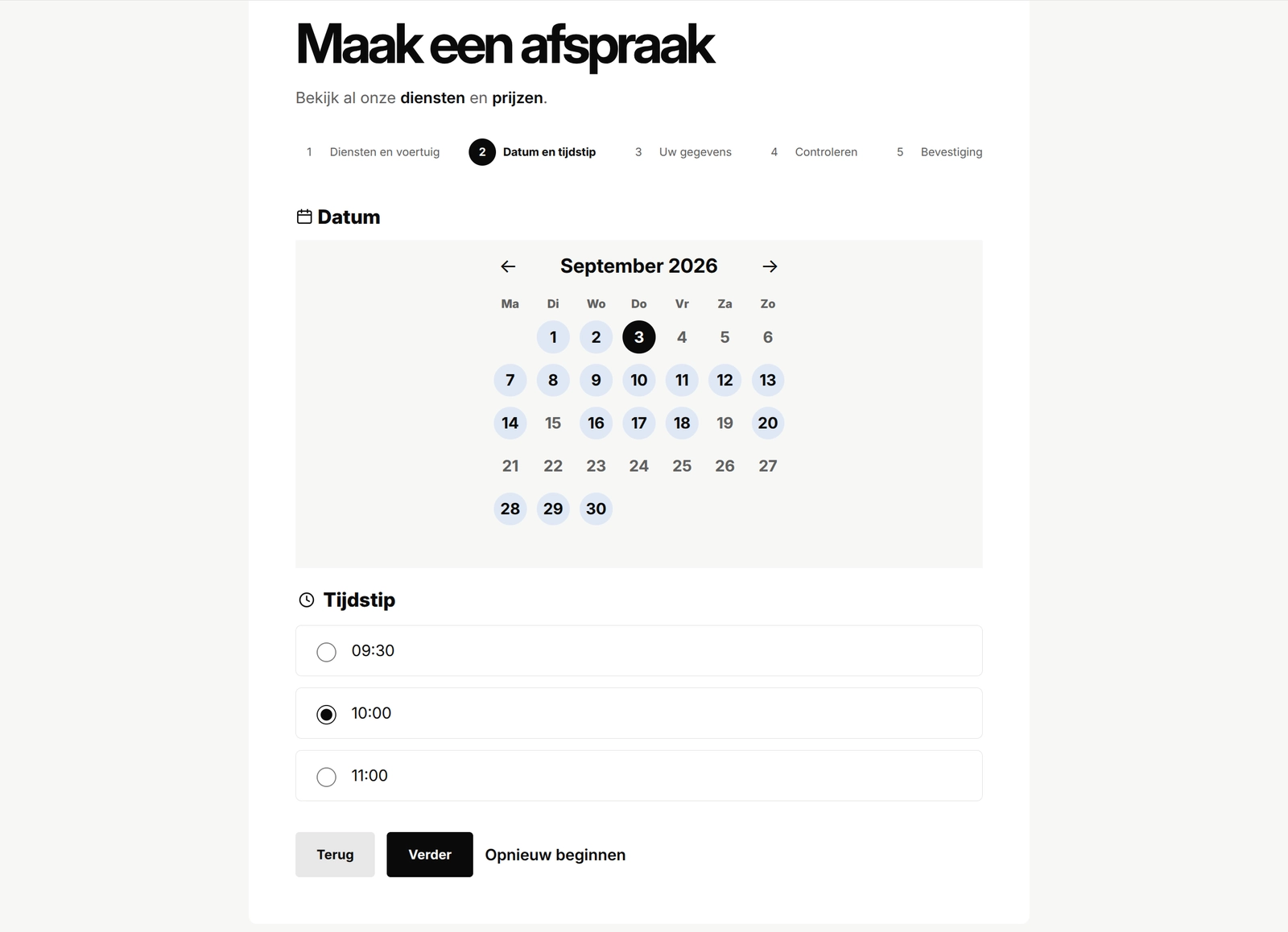
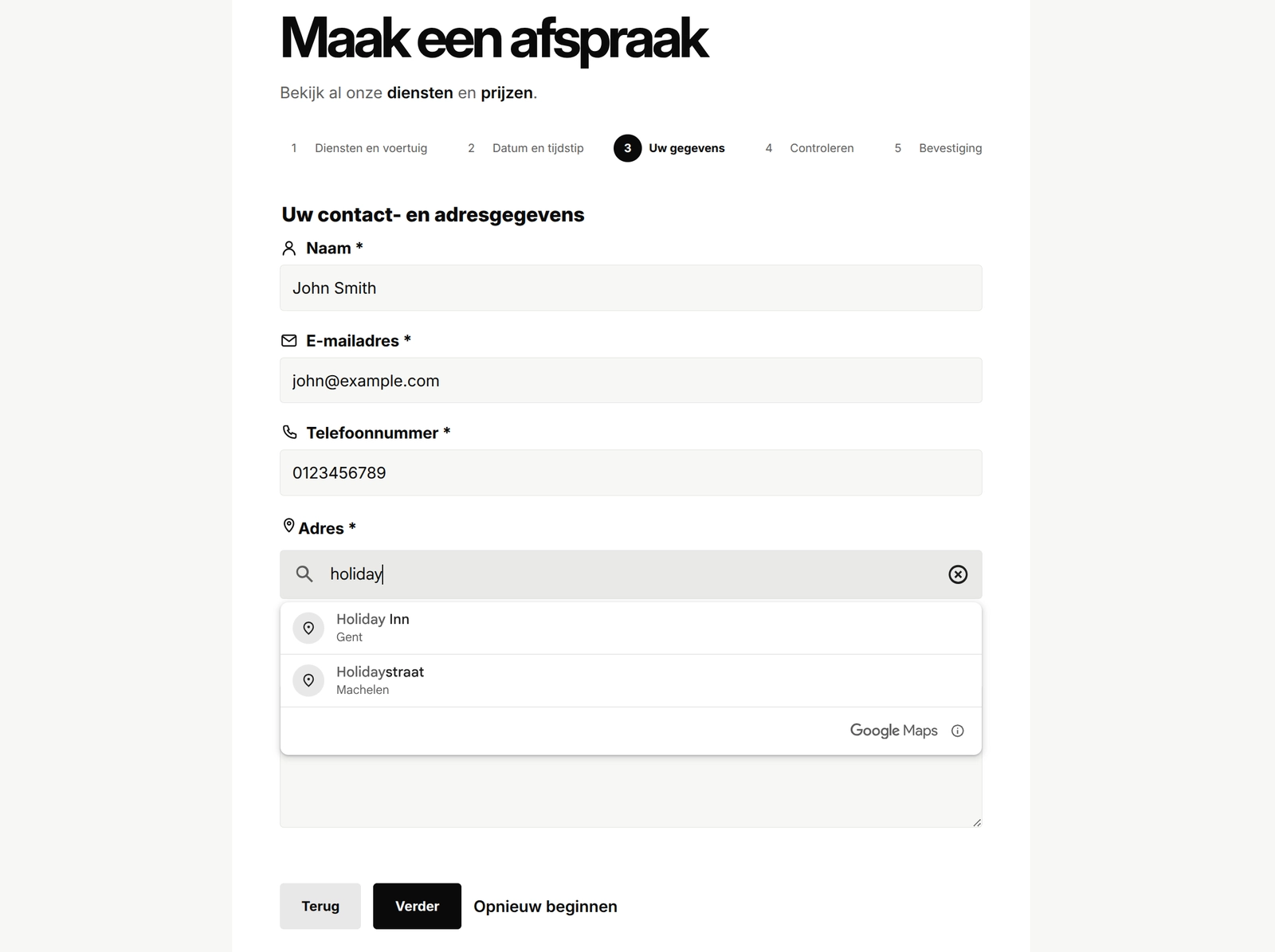
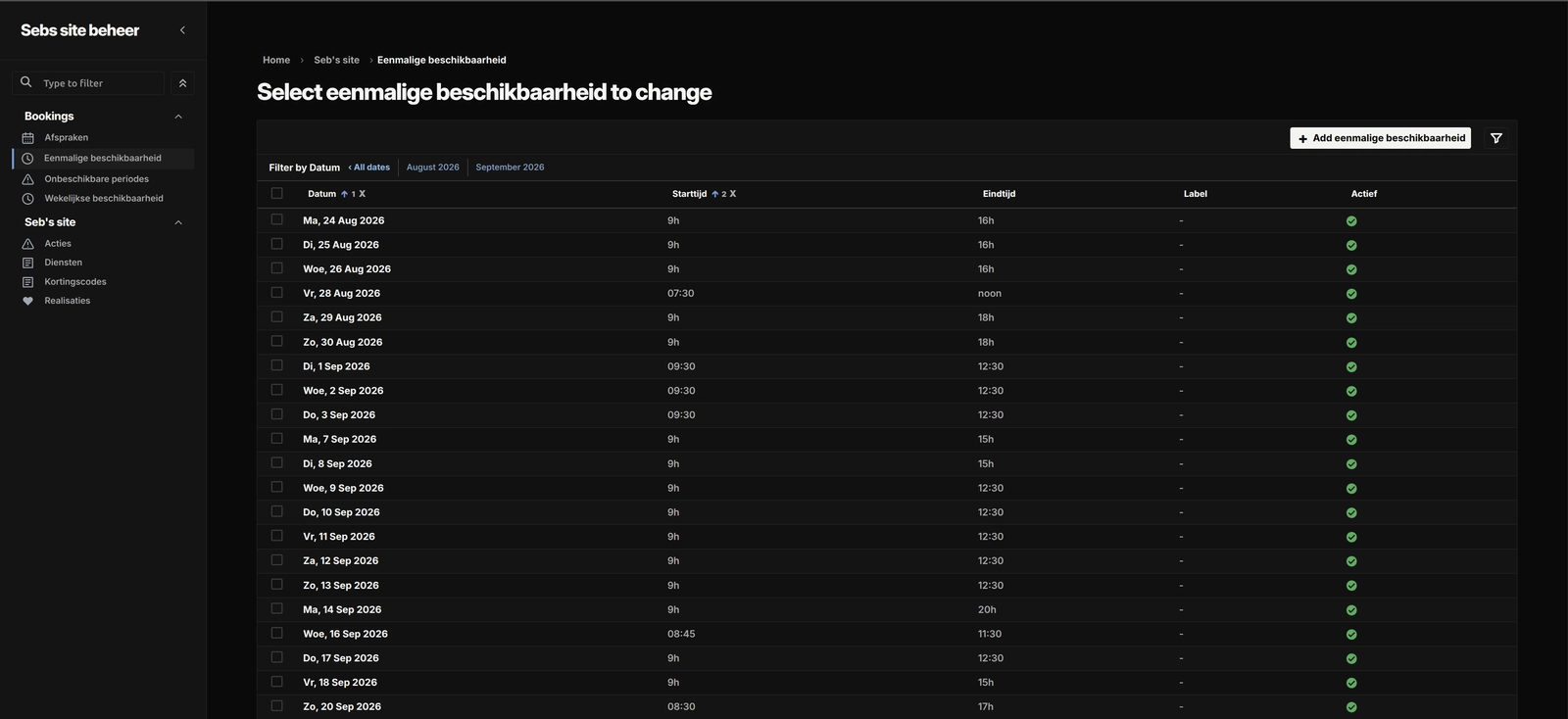
The gallery follows the booking journey from service selection and availability through final review, then shows the owner tools used to manage the schedule.
Open gallery 5 images
Project information
- Category
- Features
Built with
- Python
- Django
- HTML5
- CSS3
- JavaScript





View full feature list
This appointment system guides customers from choosing a service to confirming a time, address, and estimated price. The flow is calm and easy to follow, while the important checks stay on the server where customers cannot accidentally bypass them.
It is designed as an installable Django feature rather than a complete website. A reference frontend is included, along with clear host-integration examples, so another engineer can see how the finished experience should look and connect it to an existing Django project.
Customer booking journey
- A focused five-part journey: services and vehicle, date and time, customer details, review, and confirmation.
- Four short form stages keep each page manageable before the final confirmation screen.
- Every completed step redirects to a fresh page, which avoids accidental form resubmission when the browser is refreshed.
- Back buttons let customers revisit an earlier step without losing details that are still valid.
- Changing an earlier answer clears only the later choices that depend on it.
- A visible progress indicator shows where the customer is in the journey.
- A linked error summary helps customers move directly to fields that need attention.
- Field-level errors use clear Dutch messages and keep the customer’s other answers in place.
- A restart option clears the booking draft and personal details, then creates a new secure submission token.
- Old browser tabs cannot overwrite a newer booking step.
- A signed, random submission token is valid for one hour and helps prevent duplicate bookings.
- Refreshing or resubmitting the final page returns the existing appointment instead of creating another one.
- The confirmation summary is stored in the session and shown once, rather than exposed in the URL.
- Customer names, contact details, and addresses never appear in page URLs or metadata.
- If no bookable services are available, the customer sees a calm unavailable state with a link to the contact page.
Services and vehicle details
- Customers choose from the services currently published by the host website.
- At least one main service is required before optional extras become available.
- Optional extras are visibly muted and disabled until a main service is selected.
- Removing the final main service also removes any selected extras, so the quote cannot end up in an invalid state.
- The same service rules are checked again on the server.
- Service cards can show a starting price and an approximate duration.
- Prices can vary by vehicle type.
- Included vehicle choices cover a small car, family car or estate, and SUV or caddy.
- Make and model are collected separately, with a clear 50-character limit.
- The server recalculates service prices and duration instead of trusting values sent by the browser.
- The chosen service order is preserved in the final booking snapshot.
Availability and time slots
- Weekly opening hours provide the regular availability pattern.
- One-off availability can add special working days or extra windows.
- Closures can block a full day or part of a day, with an optional reason for the owner.
- Touching and overlapping availability windows are merged into one usable period.
- Closures always take priority over normal and one-off availability.
- The calendar shows only dates that still have enough room for the selected services.
- Past dates, closed days, full days, and windows that are too short are left out.
- Selecting a date loads the start times calculated by the server.
- The slot interval is configurable and defaults to 30 minutes.
- Back-to-back appointments are allowed when one finishes exactly as the next begins.
- Any positive overlap is rejected.
- Cancelled appointments release their time and no longer block another booking.
- All scheduling uses the Europe/Brussels time zone and a 24-hour clock.
- Daylight-saving changes are handled safely: times that do not exist or are ambiguous are not offered.
- Duration and overlap checks compare real elapsed time, including on daylight-saving transition days.
- A dedicated day record is locked while a booking is confirmed.
- When more than one day is involved, date records are locked in a stable order to reduce deadlock risk.
- Availability is checked again inside the final database transaction before the appointment is saved.
Google address and route integration
- Google Places Autocomplete helps customers enter a complete service address.
- Google Maps JavaScript loads only on the customer-details step, not across the whole site.
- The address search is presented in Dutch and gently biased towards locations within 50 kilometres of Brussels.
- The browser does not request geolocation and the search does not use an IP-location bias.
- The search is not hard-restricted to one country, which keeps nearby cross-border addresses possible.
- Customers must deliberately choose an address suggestion before continuing.
- A street-only result asks for a house number before it can be accepted.
- The browser checks for a house number, street, and postcode before saving the selected place ID.
- Customers can replace or reset an address if they chose the wrong suggestion.
- A short privacy note explains the Google-powered search, with the contact page available as a fallback.
- The browser sends the selected Google place ID, but its display text is never treated as authoritative.
- The server requests Place Details and validates that the result is a complete street address.
- The server then asks Google Routes for the driving distance from the business’s fixed starting point.
- Google returns a one-way distance in whole metres.
- The server doubles that value exactly once to produce the complete round-trip distance.
- Coordinates, calculated distance, and raw Google responses are never accepted from the customer’s browser.
- There is no public Django proxy for Google Places or Routes requests.
- Browser and server Google API keys are kept separate, and configuration rejects matching non-empty keys.
- The browser key can be restricted by website origin and API.
- The server key can be restricted by API and server egress address.
- Server requests use fixed HTTPS endpoints, short timeouts, minimal response fields, and bounded response bodies.
- Provider calls are not automatically retried, which avoids accidentally multiplying billable requests.
- Safe internal error codes keep provider details and credentials out of customer-facing messages.
- A route fingerprint ties the result to the selected place and normalised address.
- Route results have a configurable freshness window, set to 15 minutes by default.
- Stale, future-dated, malformed, or mismatched route results are rejected and refreshed.
- If a refresh changes the normalised address or distance, the review page updates and asks the customer to confirm again.
- Place Details and Routes calls have both session-level and service-wide limits.
- Restarting a draft does not reset the session’s Google request allowance.
- Service-wide counters are stored and locked in the database without saving an IP address.
- If the limiter cannot safely reach the database, the integration fails closed instead of making an uncontrolled provider call.
- Missing keys, script errors, incomplete addresses, provider failures, timeouts, rate limits, and unavailable routes all stop progress safely.
- Each blocked state uses a clear Dutch message and offers the contact page as the human fallback.
- Google calls finish before the short appointment-creation transaction begins.
Kilometres and price calculation
- The complete quote is calculated on the server with Python’s Decimal type, never floating-point arithmetic.
- Each service line uses the price configured for the selected vehicle type.
- Service lines are added into a clear service subtotal.
- The route is stored as both one-way metres and complete round-trip metres.
- Distances up to and including 10 kilometres have no travel fee.
- Longer routes cost €0.35 per kilometre for the complete round trip.
- The travel fee uses the precise stored distance before currency rounding.
- The estimated total is the service subtotal plus travel fee, minus any discount.
- Stored distance values keep three-decimal kilometre precision for an auditable calculation.
- Customer-facing distances use Belgian number punctuation and no more than one decimal place.
- Euro amounts use familiar Belgian formatting.
- A clear note explains that the final price may still depend on the vehicle’s size and condition.
- Prices, distances, travel fees, discounts, and totals posted by the browser are ignored.
- A quote fingerprint ties the displayed estimate to its services, route, and discount.
- Route and discount details are checked again before final submission.
- If the estimate changes during that check, the updated review is shown and the customer must confirm it again.
- A missing or invalid route or discount state blocks submission instead of producing a partial estimate.
Discounts
- An eligible published discount can be applied automatically.
- Customers can enter one manual discount code.
- A manual code replaces the automatic or previously entered discount; discounts never stack.
- Extra whitespace is removed and codes are normalised to uppercase.
- Invalid, inactive, expired, ineligible, or fully used codes stay editable and show a helpful field error.
- Fixed-amount and percentage discounts are supported.
- The discount can never be larger than the gross price.
- Limited-use codes are locked and checked again while the appointment is created.
- A failed booking transaction does not consume a discount use.
- Usage is derived from saved appointments rather than a separate mutable counter.
- The review shows the applied code, discount type, value, and amount.
Review and confirmation
- The review page brings the booking together before anything is created.
- It shows the selected services in order, their prices, and their estimated durations.
- It includes the service subtotal, round-trip distance, travel fee, discount, and estimated total.
- The selected date, start time, vehicle, address, and customer details are shown for a final check.
- Customers can return to an earlier step to make corrections.
- Final submission checks services, timing, route, price, discount, and consent one more time.
- A successful booking is confirmed immediately.
- Each appointment receives a unique public reference UUID.
- There is deliberately no public appointment lookup page or API attached to that reference.
- The confirmation screen does not send a customer email or promise one.
Terms, follow-up, and photo consent
- Acceptance of the booking terms is required.
- Follow-up contact and photo permission are separate optional choices.
- Both optional choices are off by default.
- Follow-up consent stores the exact wording accepted and the time it was given.
- An owner reminder becomes due 42 days after the appointment starts.
- The reminder is for the owner only and never emails the customer automatically.
- Follow-up consent can be withdrawn from the owner Admin with a POST-only, repeat-safe action.
- Withdrawal clears the reminder due date while keeping an audit timestamp.
- Photo consent stores the exact wording, time, source, and history.
- Booking-form consent is recorded separately from consent later entered by the owner.
- The consent wording covers before-and-after website or social media use and states that personal details such as number plates will not be visibly shown.
- An owner-recorded grant needs an evidence note and a check of the exact wording used.
- Withdrawals can include an owner note.
- Consent history keeps earlier grants, withdrawals, and later re-consent instead of overwriting them.
- Admin history records the responsible staff member, time, source, wording, and evidence.
Safe appointment creation
- Appointment creation is atomic: either the full booking is saved or none of it is.
- Availability, discount capacity, and submission identity are locked and rechecked together.
- Service details are saved as immutable snapshots, including name, order, duration, vehicle price, and line total.
- The quote snapshot keeps subtotal, distance, travel fee, discount, total, and price disclaimer.
- Terms and consent wording are saved with the booking so later website edits do not change the historical record.
- A secure submission hash provides duplicate protection without storing the raw browser token.
- If snapshot creation fails, the parent appointment and its partial children are rolled back.
- Database constraints protect positive durations, valid start and end times, non-negative money values, discount bounds, and total arithmetic.
- Further constraints protect follow-up and consent state consistency.
- Public references, submission hashes, and email idempotency keys are unique.
- Day and service records used by appointments are protected from accidental deletion.
- Removing a discount or email record keeps the appointment and clears only that link.
- Child service, consent, and email snapshots are removed with their parent appointment.
- Personal appointment data is visible only inside the dedicated owner Admin.
- Automated retention and hard deletion are intentionally left to the host project’s privacy policy.
Owner notifications
- A new booking creates an owner-only notification email.
- The customer does not receive an automated booking email.
- The message uses a fixed trusted sender and places the customer’s email in Reply-To.
- Customer notes are included for the owner.
- Messages enter the existing high-priority Django Post Office queue.
- A durable appointment-email record tracks each message kind and idempotency key.
- Short dispatch claims prevent two workers from sending the same notification at once.
- Reconciliation can recognise an email that was already queued or sent.
- If queue-record creation fails after the appointment is saved, the appointment remains valid.
- The customer sees a private retry screen, and retrying does not create another appointment.
- Provider and queue failures remain safe to retry.
- Logs contain only broad failure categories and the internal appointment ID, not names, emails, phone numbers, addresses, or notes.
- A management command finds due follow-up reminders and creates them idempotently for the owner.
- The host project remains responsible for running its mail worker and scheduling commands.
Submission and provider limits
- Final booking submissions use a global database-backed fixed window limit.
- The default allowance is 10 successful bookings per 15-minute window.
- Successful bookings consume their allowance inside the same transaction.
- Rolled-back bookings do not consume it.
- A full window returns a recoverable private HTTP 429 response.
- The quota stores no IP address, session key, or customer identity.
- Google Place Details and Routes have their own separate limits.
- Limit records stay internal and are not exposed in Admin.
Privacy and response protection
- Booking pages send noindex, nofollow, and noarchive instructions.
- Responses use Cache-Control: no-store so personal booking pages are not kept in shared caches.
- A same-origin referrer policy keeps booking paths away from unrelated sites.
- Google requests receive only the website origin required by the integration.
- The application does not retain autocomplete search history, browser coordinates, or raw provider payloads.
- Only the confirmed normalised address and the distances needed for the appointment are saved.
- Unsupported HTTP methods receive the same private response protections.
- There is no public appointment list, detail, edit, cancel, reschedule, or mobile API.
Dedicated owner Admin
- Appointment management lives in a separate owner Admin rather than the general Django Admin.
- Access requires an active staff account, the correct owner group, the dedicated host, and one-time-password verification.
- Internal locking, quota, and email models remain hidden.
- Weekly availability forms reject overlapping active windows while allowing one window to touch the next.
- One-off availability cannot be created in the past.
- Started schedule windows receive stricter editing safeguards.
- Closures can carry categories and owner-facing reasons.
- A saved one-off day can be copied to a future inclusive date range of up to 732 days.
- The source day is never overwritten by the copy action.
- Add mode keeps different existing windows and skips exact duplicates.
- Replace mode removes target windows before copying and requires delete permission.
- Copying is atomic, so one validation failure rolls the whole action back.
- Inactive source windows remain inactive after copying and never become bookable by accident.
- The result reports how many windows were created, replaced, or skipped.
- Date defaults use ISO values reliably even while the interface is Dutch.
- Appointment details are read-only apart from the controlled photo-consent evidence actions.
- Cancellation uses an explicit POST action, is safe to repeat, and releases the time slot.
- Rescheduling uses an explicit POST action with its own permission checks.
- Rescheduling locks the old and new dates in a stable order and excludes the appointment from its own conflict check.
- It changes only the appointment time; customer details, services, quote, terms, and consent snapshots stay intact.
- Follow-up consent can be withdrawn without editing the rest of the appointment.
Reference frontend
- A ready-to-read server-rendered frontend shows another engineer how the feature should feel in a real site.
- The supplied base template includes the matching header, footer, navigation, and theme switcher.
- Light and dark modes use the same visual styling as the source appointment experience.
- The chosen theme is remembered in the browser.
- Booking pages have responsive layouts for phones, tablets, and larger screens.
- Controls are comfortably sized for touch.
- The implementation uses Django templates, standard form controls, CSS, and small pieces of vanilla JavaScript.
- It does not require a frontend framework.
- Labels, fieldsets, linked errors, visible focus states, and aria-current support make the flow easier to navigate.
- Decorative icons stay out of the accessibility tree.
- Calendar data is served only as a private helper for the booking page, not as a public API.
- If the Google address widget cannot run, the customer receives a clear contact fallback.
- Templates, scripts, and styles are namespaced so they can sit safely beside other Django apps.
Dutch locale
- All customer-facing booking copy is written for a Dutch-language website.
- Dates, times, distances, and euro amounts use familiar Belgian presentation.
- User-facing strings are marked for Django translation where practical.
- The extracted package does not include a separate app-specific translation catalogue yet.
Host integration
- The feature is packaged at the repository root as appointments.AppointmentsConfig.
- Its stable Django app label keeps existing migrations and database tables compatible.
- Migrations cover the full appointment, availability, snapshot, consent, notification, quota, and locking model history.
- Example settings show the required business origin, Google credentials, rate limits, and slot interval.
- Example URL configuration shows how to mount the public flow and dedicated owner Admin.
- Host-model examples explain the small service, discount, and announcement contracts the app expects.
- The host project supplies Django settings, sessions, CSRF protection, templates, static files, database configuration, and email delivery.
- The host also supplies the published services, discounts, site navigation, contact page, and shared owner Admin shell.
- Google browser and server credentials are required before address search and route pricing can work.
- Production numeric settings must be positive and are validated early.
- The reference frontend can be used as-is for implementation guidance or replaced by the host’s own templates.
- No dedicated API, mobile client, worker package, or deployment scheduler is introduced.
Test and implementation coverage
- The extracted showcase contains 136 focused Django test functions.
- Tests cover models, forms, database constraints, and migration behaviour.
- Availability selectors and booking services are checked independently from the views.
- Pricing tests cover vehicle prices, complete round-trip kilometres, the free-distance boundary, travel fees, discounts, and quote fingerprints.
- Google tests cover request contracts, safe error handling, stale results, route changes, limits, and configuration mistakes.
- Booking-flow tests cover step order, preserved data, stale tabs, restart behaviour, duplicate submissions, and one-time confirmation details.
- Response tests cover privacy headers, host boundaries, and unsupported methods.
- Admin tests cover owner access, one-time-password enforcement, schedule validation, copying, cancellation, rescheduling, and consent history.
- Notification tests cover queueing, idempotency, retries, reconciliation, and safe logging.
- Concurrency tests document and exercise the intended locking behaviour where the database supports it.
- SQLite is useful for local development, but its row-locking limitation means the final concurrency proof is skipped there.
- Production should use a database with working select_for_update() row locks, such as PostgreSQL.
- JavaScript asset behaviour has focused Django coverage, with the reference screens also available for a manual browser review.
- The full suite still needs a compatible host project because the showcase deliberately relies on host service, discount, Admin, and email contracts.
Deliberate boundaries
- This is an implementation-ready Django feature, not a standalone business website.
- It does not provide customer accounts or public appointment management.
- It does not send customer confirmation or reminder emails.
- It does not expose appointment data through DRF or another public API.
- It does not include a mobile application.
- It does not choose the host’s data-retention or hard-deletion policy.
- It does not deploy workers, schedule follow-up commands, or provision Google credentials.
- Those boundaries keep the package focused while leaving the host project in control of branding, operations, privacy policy, and customer communication.