
Telegram Ops Notifications
Private Telegram notifications and command controls for VPS maintenance and health reporting.
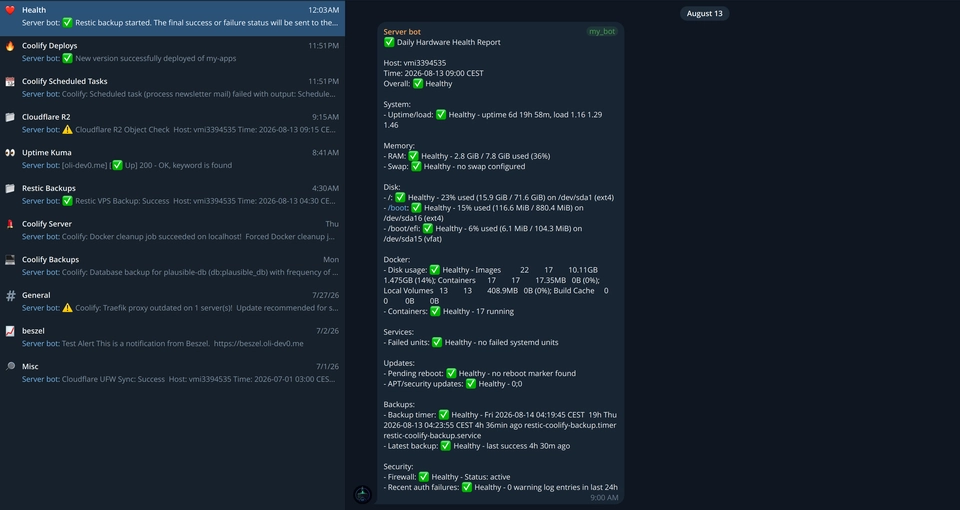
Telegram Ops Notifications keeps me informed about the jobs running on my VPS. It sends clear Telegram messages when backups finish, firewall rules are updated, or something in the daily health check needs attention. It also watches Cloudflare R2 backup storage for changes.
Useful without becoming a remote shell
I can ask the bot for a fresh report or start a maintenance task from Telegram, but only from the right conversation and with an approved account. Actions that could change the server always ask for a second, exact confirm. There is no open-ended remote shell hiding behind the bot, which keeps the useful shortcuts focused and easier to trust.
I kept the project small so it fits naturally around the scripts and scheduled jobs already running on the VPS. If Telegram is unavailable after a backup succeeds, the backup is still treated as successful and the problem is logged for later. The main notification, health-check, command, and backup-storage flows are covered by automated tests.
Telegram Ops Notifications gallery
Operational notifications, health reporting, and carefully scoped Telegram commands working together as a small VPS operations tool.


Open gallery 4 images
Project information
- Category
- Operations
Built with
- Python
- Bash
- Linux
- Cloudflare





View full feature list
Telegram Ops Notifications
Telegram Ops Notifications is a private Telegram companion for VPS maintenance. It reports important events, gives an approved operator a few carefully limited controls, and keeps notification problems separate from the jobs being reported.
Maintenance notifications
- Reports when Cloudflare firewall rules have been updated successfully.
- Reports when VPS backups finish successfully.
- Reports failed backups with enough detail to see what went wrong.
- Sends a daily message with the overall health of the VPS.
- Watches Cloudflare R2 backup storage for files being added, changed, or removed.
- Sends a regular “nothing changed” message when the R2 backup storage is unchanged.
- Keeps firewall, backup, health, and storage messages in their own Telegram topics.
- Uses clear status labels and severity indicators in the messages.
- Includes useful details such as the server name, time, duration, counts, and example file names when available.
- Keeps tokens, passwords, private keys, and raw logs out of Telegram messages.
Daily VPS health report
- Shows how long the server has been running and how busy it is.
- Reports memory and swap usage.
- Checks available disk space without counting temporary system files as normal disks.
- Includes Docker disk usage and running-container details when Docker is available.
- Reports services that have failed.
- Checks whether the server needs a reboot.
- Reports available system and security updates.
- Checks the backup schedule and the latest backup result.
- Reports available CPU temperature readings.
- Checks disk health when the server provides SMART information.
- Reports the current firewall status.
- Summarises recent suspicious or failed login activity when it is available.
- Marks an unavailable check clearly instead of allowing it to stop the whole report.
- Uses the same section order every day so the report is easy to scan on a phone.
Telegram commands
- Lets an approved user request a fresh health report with
/report. - Lets an approved user start a full backup with
/backup confirm. - Lets an approved user start security updates with
/security_updates confirm. - Lets an approved user start regular system updates with
/apt_updates confirm. - Lets an approved user fix the server's
eth0network readiness with/network_recover confirm. - Lets an approved user schedule a server restart one minute later with
/reboot confirm. - Shows the commands available in the current topic with
/help. - Shows a confirmation prompt when a command that changes the server is missing
confirm. - Accepts the usual
/command@bot_usernameform when it is addressed to this bot. - Gives an approved user a clear response when they send an unknown command.
- Runs commands only in the configured chat and topic.
- Leaves room for different commands to have different meanings in different topics later.
Access and safety controls
- Requires a list of approved Telegram user IDs before command handling can be turned on.
- Ignores commands from other chats, topics, users, or bots.
- Runs the command listener as a limited system account instead of as root.
- Gives each maintenance action one specific, approved way to run it.
- Allows only the listed backup, update, network-recovery, and delayed-restart actions.
- Keeps network recovery limited to
eth0and the server's network-wait check. - Does not provide a general-purpose remote shell.
- Never turns text from a Telegram message into an arbitrary server command.
- Requires a separate confirmation before starting a backup, update, network repair, or restart.
- Keeps the production settings file protected and outside the repository.
- Refuses to start if Telegram is still configured to send updates through a webhook.
- Ignores old queued commands when the listener starts for the first time instead of running them unexpectedly.
Reliability and operations
- Uses one shared notifier so the maintenance scripts do not each need their own Telegram code.
- Supports dry runs that show the message without sending it.
- Accepts safe, non-secret details for each type of notification.
- Does not turn a successful firewall update or backup into a failed job just because Telegram could not be reached afterward.
- Logs delivery problems so they can be checked later.
- Retries temporary Telegram, DNS, rate-limit, and server problems for a limited time.
- Shows configuration errors and permanent Telegram failures instead of hiding them.
- Remembers the last message it handled so the listener can continue after a restart.
- Saves that listener state safely and keeps it separate from the R2 watcher state.
- Runs the daily report and R2 check on separate scheduled system jobs.
- Includes a laptop-side menu for sending approved test messages through the VPS.
R2 backup storage monitoring
- Connects to Cloudflare R2 and reads the list of stored backup files.
- Uses the request-signing method required by R2 without exposing the secret key.
- Compares the current file list with the previous run.
- Reports new, changed, removed, and unchanged files.
- Saves the previous file list locally so the next run has something to compare.
- Keeps R2 credentials and storage paths in protected server settings.
Tests and deliberate boundaries
- Tests settings files, required values, invalid values, and missing files.
- Tests message wording and the overall severity shown in a health report.
- Tests dry runs and invalid command-line input.
- Tests who can run a command, where it can be run, and whether confirmation is required.
- Tests that each maintenance action starts only the intended server task.
- Tests how the listener remembers its place, handles its first start, retries temporary failures, and stops on permanent failures.
- Tests the order and limits of the network-recovery action.
- Tests R2 settings, signed requests, file-list parsing, changes between runs, heartbeat messages, and dry runs.
- Uses Python's standard library for the core notifier and dependency-free automated tests.
- Does not include a public website, internal API, database, mobile app, or history dashboard.
- Does not repair the server automatically or provide arbitrary server commands.
- Does not report R2 quota or the provider's total storage size.
- Does not include live Telegram, R2, systemd, permissions, firewall, or backup-service tests because those need real credentials or VPS services.